A deck worth reviewing holds what the lecturer explained, one fact per card, in your own words. The slide text alone cannot give you that, because a slide is a cue for what was said. So understand the lecture first, and fill the gaps from the recording, the reading or your notes. Then write one question per fact. The parts of a slide that make good cards are definitions, each step of a process as its own card, each labelled part of a diagram, and a "why" question for every example. Skip titles, agendas and long lists. Review the cards on a spaced schedule rather than all at once before the exam. An AI can draft cards from a slide file for you; check every one against the lecture before you keep it.
Why do flashcards copied from slides fail?
A slide is compressed on purpose. "Glycolysis: cytoplasm, 2 ATP, no oxygen" makes sense while the lecturer talks over it. On a card, it becomes a front that says "Glycolysis" and a back you try to recite.
That card goes wrong in three ways. It tests whether you remember the lecturer's shorthand, not whether you understand the idea. Its answer is a list, so you mark yourself right for getting most of it. And the explanation that made it make sense was spoken, so it is on no card at all.
The first of SuperMemo's twenty rules for writing cards is blunt about this: "Do not learn if you do not understand." A 2013 review of study techniques by Dunlosky and colleagues rated practice testing high in usefulness and rereading low. A card built from a copied slide sits closer to rereading than to testing.
What should I do before making a single card?
Go through the slides while the lecture is fresh, and mark every slide you could not explain out loud to a friend. Those marks are the real work.
- For each marked slide, find the missing explanation in the recording, the assigned reading or your own notes.
- Write the missing sentence into your notes under that slide's heading, in your words.
- Get the big picture before the details. SuperMemo's second rule says to learn before you memorize: know what cellular respiration is for before you learn where each stage happens.
- Only then start writing cards.
This step is what makes the rest fast. A card is easy to write once you know what the answer means.
Which parts of a slide deserve a card?
Take a typical lecture, "Lecture 7: Cellular respiration": a title slide, a "Today" slide, three slides on the stages, and one slide that asks "Why does cyanide kill?" Here is how each kind of content becomes cards.
Definitions
A term and its meaning is the simplest card, and the most common one on an exam. Ask it the way the exam will, usually the term from its meaning, and add the reverse only when you would be asked it both ways.
Front: "What is the final electron acceptor in oxidative phosphorylation?" Back: "Oxygen."
Processes and sequences
A slide that lists stages is a process, and each step gets its own card. Ask what comes before or after, or where a step happens.
Front: "Before it enters the Krebs cycle, what is pyruvate converted to?" Back: "Acetyl CoA."
Front: "Where in the cell does glycolysis happen?" Back: "The cytoplasm."
Resist one card that asks for all the stages in order. That is the list problem again.
Diagrams
A labelled diagram holds one card per label. Point at one part and ask what it is or what it does.
Front: "Which membrane holds the electron transport chain?" Back: "The inner mitochondrial membrane."
SuperMemo's rules favour pictures over words where a picture carries the idea, and Anki's manual describes Image Occlusion, which hides parts of an image for you to recall. In a text card, name the part and its position.
Examples and "why" questions
Example slides are where exam questions come from, because they test whether you can apply the idea. Turn each one into a "why" question with a one sentence answer.
Front: "Why does blocking the last complex of the electron transport chain stop ATP production?" Back: "Electrons stop flowing, so the proton gradient collapses and ATP synthase has nothing to run on."
What to skip
- Title slides, "Today" slides and section dividers.
- "Questions?" and reference slides.
- Long lists you would never be asked to recite in full.
- Anything you already know cold. A card you will never miss costs review time for nothing.
Learning objectives are the exception: each one can become a question, and those are often the best cards in the deck.
How should each card be worded?
One fact, one answer. SuperMemo calls this the minimum information principle: several simple cards are easier to keep than one complex card, even though there are more of them. If the back needs "and", it is probably two cards.
Keep the answer short. A word, a number or one sentence. If you would accept three different answers, the question is too loose.
Use a cloze when a sentence carries the fact. Anki's manual defines a cloze deletion as hiding one or more words in a sentence. "ATP synthase uses the ___ to make ATP" with "proton gradient" on the back is a cloze. Scholarwire cards have a Front and a Back, so write the sentence with a blank on the front and the missing words on the back.
Break up sets and lists. SuperMemo's rules warn that a set of more than five items is very hard to remember as one card. Turn "Name the products of the Krebs cycle" into one card per product, or one cloze per item.
Separate look-alikes. NADH and FADH2 are easy to swap. When two cards read almost the same, change the wording until each has only one possible answer.
Can AI make the flashcards from my slides?
Yes. A draft from a slide file saves the typing, and it makes predictable mistakes:
- Cards from the title or agenda slide ("What topics does Lecture 7 cover?").
- Cards whose answer is a list, because the slide was a list.
- Facts from general knowledge that your lecturer did not teach, or taught with different terms or notation.
- Nothing about what was only said aloud, because the slide text is all it has.
A quick check fixes most of this. Open the new deck's card list and ask three things of each card. Would it plausibly be on the exam? Does it have exactly one answer? Does it match what the lecture said? Edit or delete anything that fails, then add by hand the two or three facts the lecturer stressed that the slides left out.
How do I make a deck from slides in Scholarwire?
Pick the source material
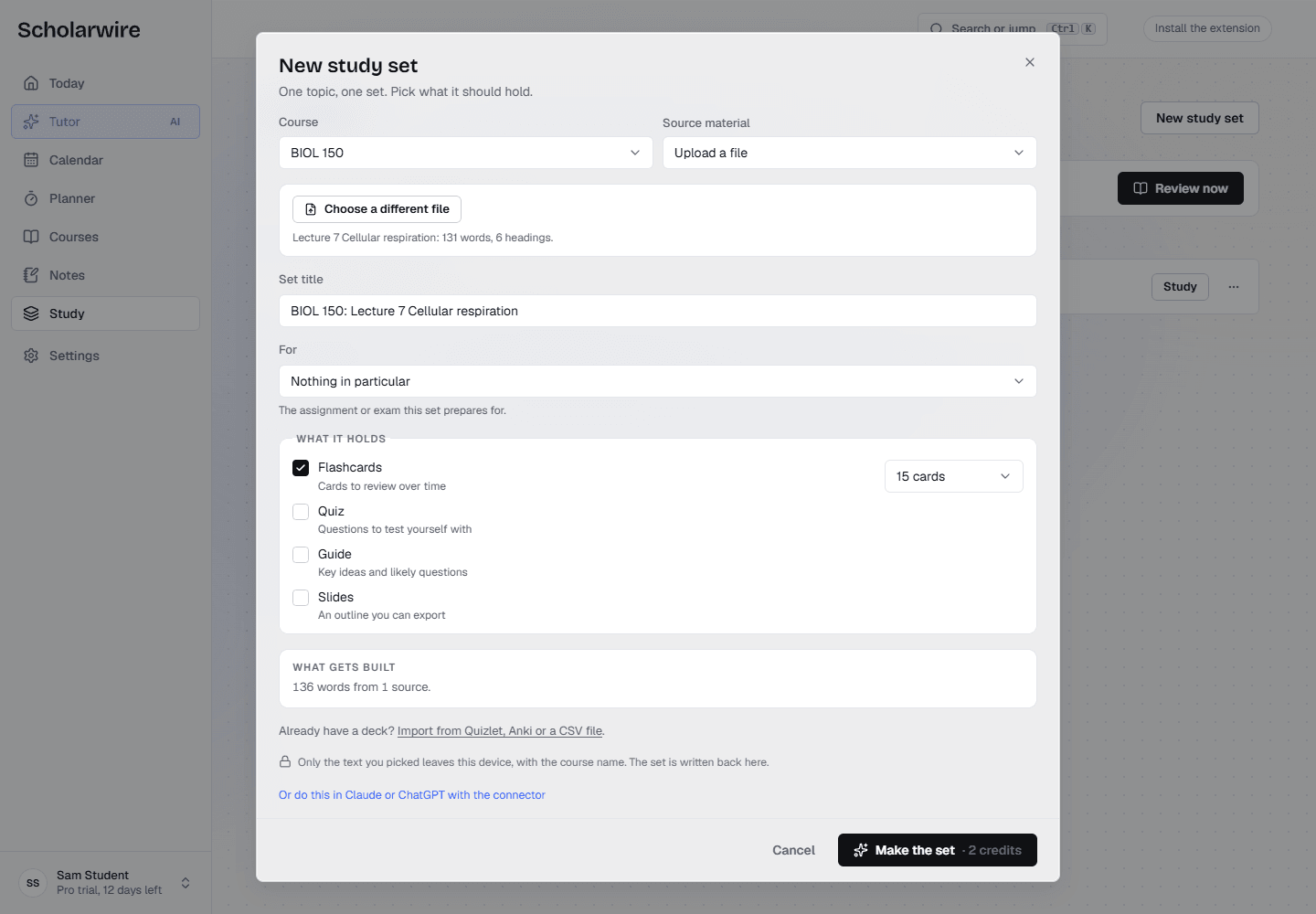
The dialog's Source material menu has three options that fit slides:
- Upload a file takes a PowerPoint (.pptx), Word, text or Markdown file from your computer, up to 2 MB.
- File summaries you saved uses every summary you saved in that course. On the course page, open Files, press Summarize on the PDF, then Save as note. To build from one lecture's summary only, choose Pick specific notes and tick that summary.
- Pick specific notes uses your own lecture notes, or slides added to a note from Google Drive, which reads PowerPoint and Google Slides files up to 25 MB. Adding a file from Google Drive covers that step.
Build the deck
- Open Study and press New study set.
- Choose the Course, then the Source material, and add the file or pick the notes.
- Check the Set title. It suggests one from the course and the file, such as "BIOL 150: Lecture 7 Cellular respiration".
- Under What it holds, keep Flashcards ticked and choose how many cards, 15 by default and up to 30. Quiz is ticked too when the dialog opens; untick it if you only want cards.
- Press Make the set. The button shows what it will cost in credits before you press it. When it finishes, choose Open the set.
Then run the check from the section above. On the deck's Cards tab, every card has edit and delete controls, and the Add a card form at the top takes a Front and a Back for the facts the draft missed.
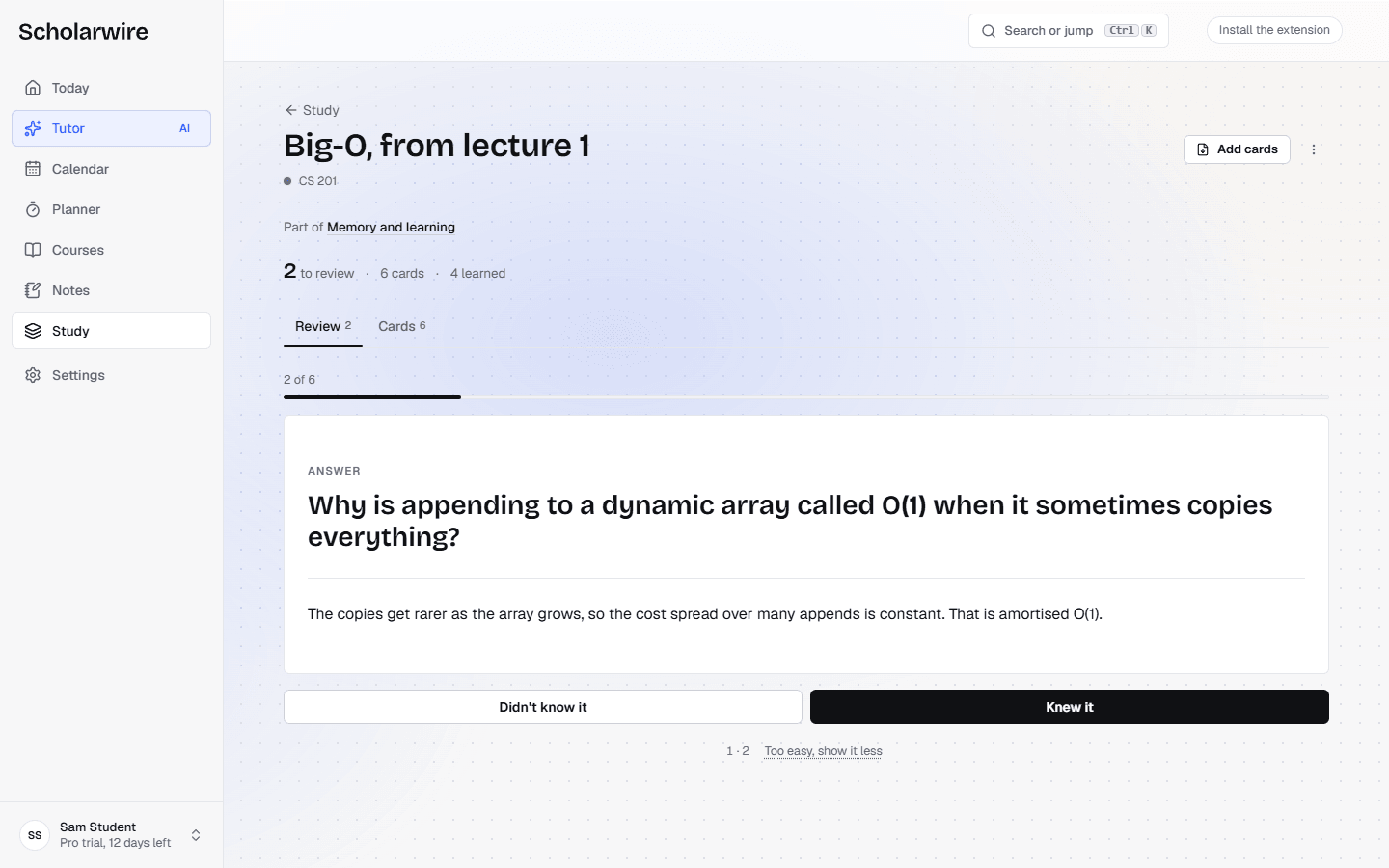
To review, press Study now on the set, or Review now on the Study page. Each card shows its front first. Press Show answer, then Didn't know it or Knew it. A card you will never miss can take Too easy, show it less.
When should I review the new cards?
Start the same day. A new card is due straight away, and every rating after that moves it. Scholarwire schedules each card with FSRS, which aims to show it again when your chance of recalling it has dropped to about 90 percent. Rate honestly: a "Knew it" on a card you half remembered pushes it out too far. Spaced repetition and FSRS explained covers how the scheduler decides, and if the exam is already close, studying for an exam in five days shows how to fit cards into a short plan.
Where does this fall short, and what does it cost?
From a PowerPoint file, Scholarwire reads the text typed on each slide: titles, bullets and text boxes. It does not read pictures, words inside a picture, SmartArt or chart labels, or the speaker notes.
Upload a file does not read PDFs, and it stops at 2 MB, which a PowerPoint full of photos can pass. A PDF on Canvas goes through Summarize instead, which works only on PDFs under 15 MB that Canvas has not locked, and needs Scholarwire for Canvas, the extension, on a computer (install says where it stands today). The cards then come from the summary, so they carry less detail than the full slides. A larger PowerPoint goes through Google Drive.
Building cards spends Scholarwire AI credits. A flashcards build costs 2 to 7 credits, depending on how much material and how many cards; summarizing a Canvas PDF costs 3 to 20, depending on the file's size. Free includes 3 credits a month, enough for one small deck. The 14-day trial adds 3 a day, 30 in all, and Pro includes 250 a month.
On Pro and during the trial, the Scholarwire connector lets Claude or ChatGPT read course files synced from Canvas, including PDFs and PowerPoint files under 15 MB, and write the deck back into Scholarwire. The assistant does the writing on your own Claude or ChatGPT plan, so it spends no Scholarwire credit. Using Scholarwire in Claude and ChatGPT covers the setup, and how it works shows the rest of the app.
Cards you write yourself, decks you import and every review cost nothing, on any plan.
Common questions
How many cards should one lecture make?
As many as there are facts you would need to answer an exam question, and no more. A dense science lecture can hold dozens and a discussion lecture a handful. If you are padding the deck with agenda items to reach a number, stop.
Should I make cards before or after the lecture?
After. Skimming the slides beforehand helps you follow the lecture, but cards written before you understand the material tend to be copies of the slides. Make them once the gaps are filled, while the lecture is still fresh.
Can I bring an Anki or Quizlet deck into Scholarwire?
Yes. At the foot of New study set, choose Import from Quizlet, Anki or a CSV file. It reads a Quizlet export, an Anki .txt export (Notes in Plain Text) or a CSV of front, back and tags. Anki .apkg files are not read, and an import spends no credits.
Do image-heavy slides work?
Only the text typed on each slide is read from a PowerPoint file, so a slide that is mostly a picture, a SmartArt diagram or a chart arrives as little more than its title. Write the diagram cards yourself from the lecture, one labelled part per card.
Sources
Topics:flashcardsstudyspaced repetition